
Binary to String Converter: How to Decode Binary Data into Readable Text
Binary ⇄ String converter
Convert plain text to binary code, or binary back to readable text — instantly, in your browser.
A binary to string converter transforms sequences of 0s and 1s into human-readable text characters. According to Stack Overflow’s 2023 Developer Survey, over 71% of developers work with binary data regularly during debugging and data transmission tasks. If you’ve ever stared at a wall of binary digits wondering what message they contain, you’re not alone.
This guide shows you exactly how binary to string conversion works, which tools handle it best, and when you’ll actually need this skill.
What Is Binary to String Conversion?
Binary to string conversion translates machine-readable binary code (combinations of 0 and 1) into text characters that humans can read. Each group of 8 binary digits (called a byte) represents one character according to encoding standards like ASCII or UTF-8.
Computers store and transmit all text data as binary. When you type a letter, your computer converts it to binary. When you read text on screen, your computer converts binary back to letters. That’s the conversion of binary to decimal and then to characters happening behind the scenes.
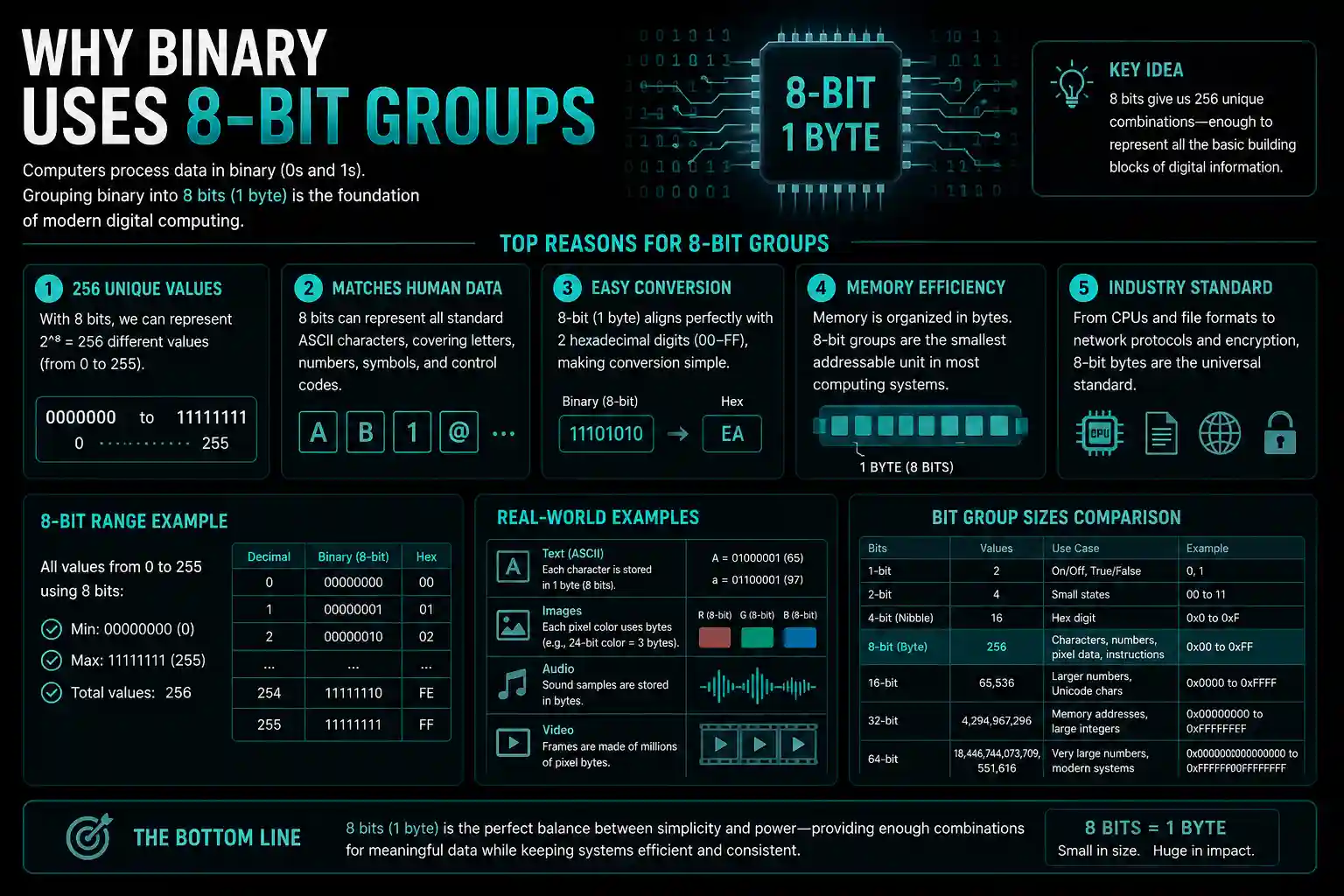
Why Binary Uses 8-Bit Groups
Standard ASCII encoding uses 8 bits (1 byte) per character. This allows 256 possible combinations (2^8), enough to represent uppercase letters, lowercase letters, numbers, punctuation marks, and control characters.
For example: The binary sequence 01001000 breaks down as 64 + 8 = 72 in decimal, which represents the letter “H” in ASCII.
How Does a Binary to String Converter Work?
A binary to text converter online processes your input through four distinct steps. Each step handles a specific part of the translation from machine code to readable characters.
Step 1: Input Processing and Delimiter Detection
The converter first identifies how your binary data is formatted. Binary strings come with spaces, commas, newlines, or no separators at all. Good converters automatically detect these patterns and split the input into 8-bit chunks.
Step 2: Binary to Decimal Conversion
Each 8-bit group gets converted to its decimal equivalent using positional notation. The rightmost bit represents 2^0, the next represents 2^1, and so on up to 2^7 for the leftmost bit.
Take 01000001 as an example: (0×128) + (1×64) + (0×32) + (0×16) + (0×8) + (0×4) + (0×2) + (1×1) = 65
Step 3: Character Mapping
The decimal value maps to a character using the selected encoding scheme. ASCII value 65 corresponds to uppercase “A”. The converter looks up this value in its character table and retrieves the matching symbol.
Step 4: Output Assembly
All converted characters get combined into a continuous string. The converter preserves the original sequence, so “01001000 01001001” becomes “HI” rather than “IH”.
| Binary | Decimal | Character |
|---|---|---|
| 01001000 | 72 | H |
| 01100101 | 101 | e |
| 01101100 | 108 | l |
| 01101100 | 108 | l |
| 01101111 | 111 | o |
What Are the Common Character Encoding Standards?
Character encoding standards define how binary numbers map to text characters. Different standards support different character sets, from basic English letters to complex international scripts and emojis.
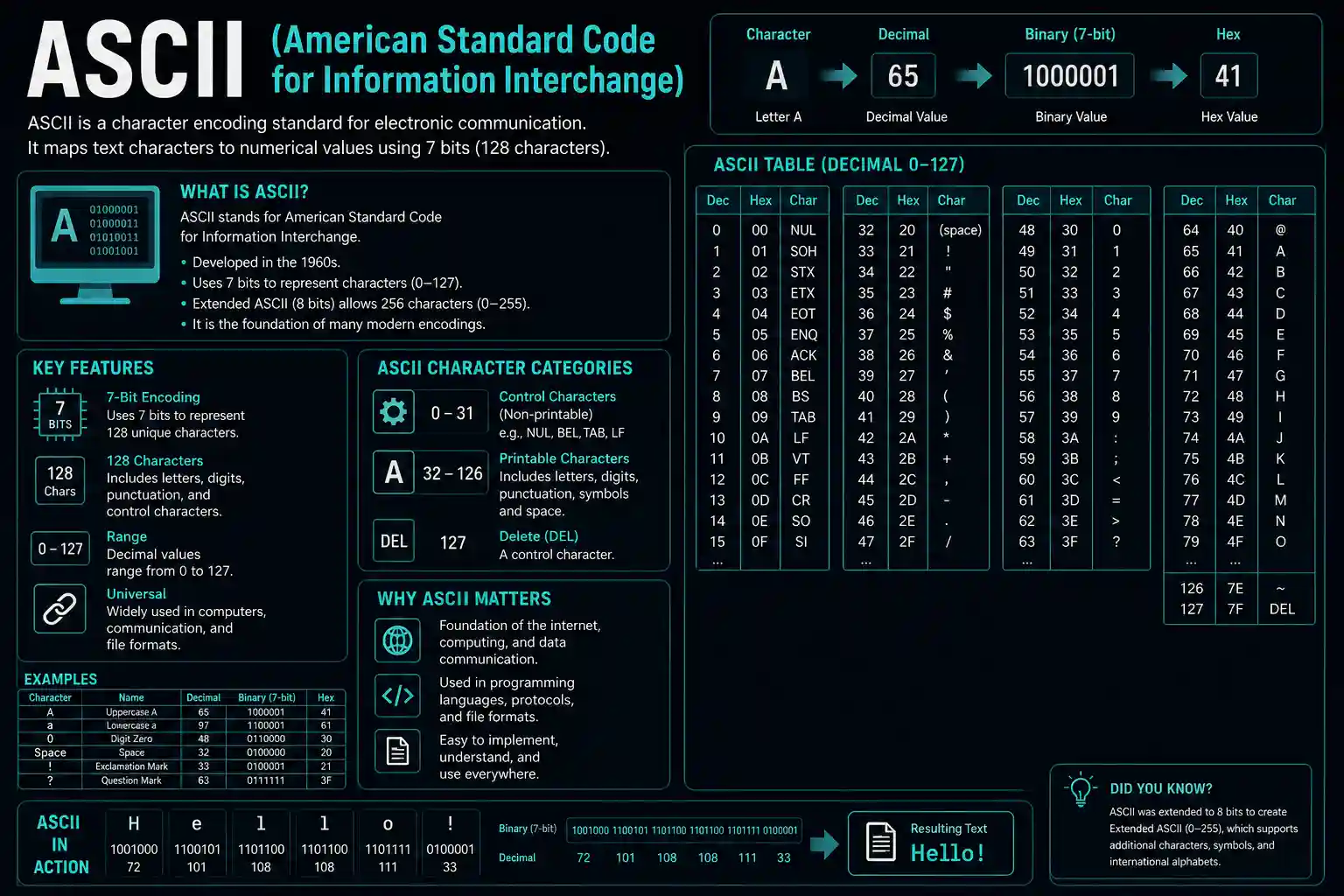
ASCII (American Standard Code for Information Interchange)
ASCII uses 7 bits to represent 128 characters including English letters, numbers, basic punctuation, and control codes. Extended ASCII adds an eighth bit for 256 total characters, covering additional symbols and accented letters used in Western European languages.
ASCII works perfectly for English text but fails with languages like Chinese, Arabic, or Hindi. That’s where Unicode steps in.
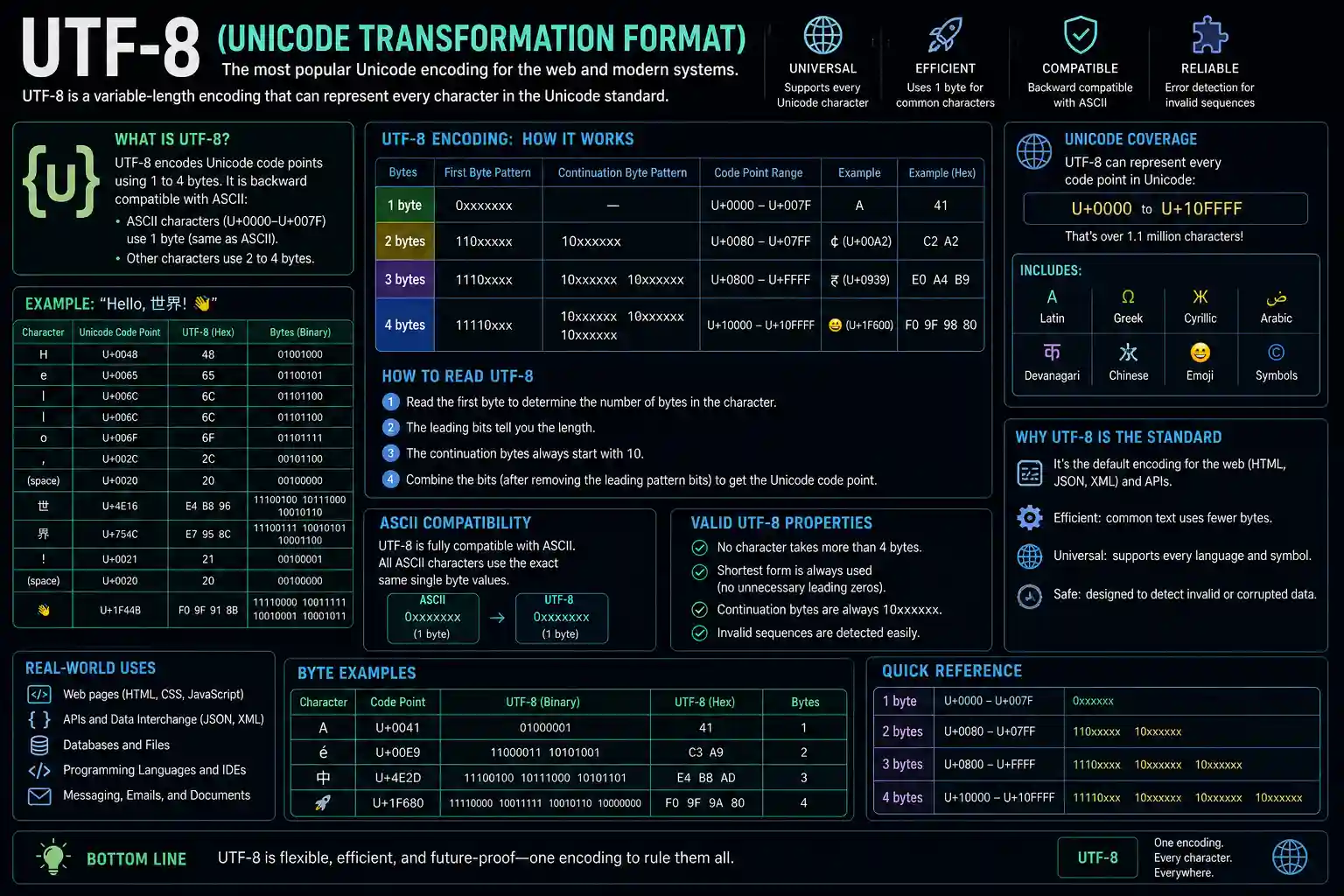
UTF-8 (Unicode Transformation Format)
UTF-8 uses variable-length encoding. Basic ASCII characters still use 8 bits, but complex characters use 16, 24, or even 32 bits. This flexibility supports over 140,000 characters covering virtually every written language.
Most modern websites and applications use UTF-8 as their default encoding. It’s backward compatible with ASCII while supporting global character sets.
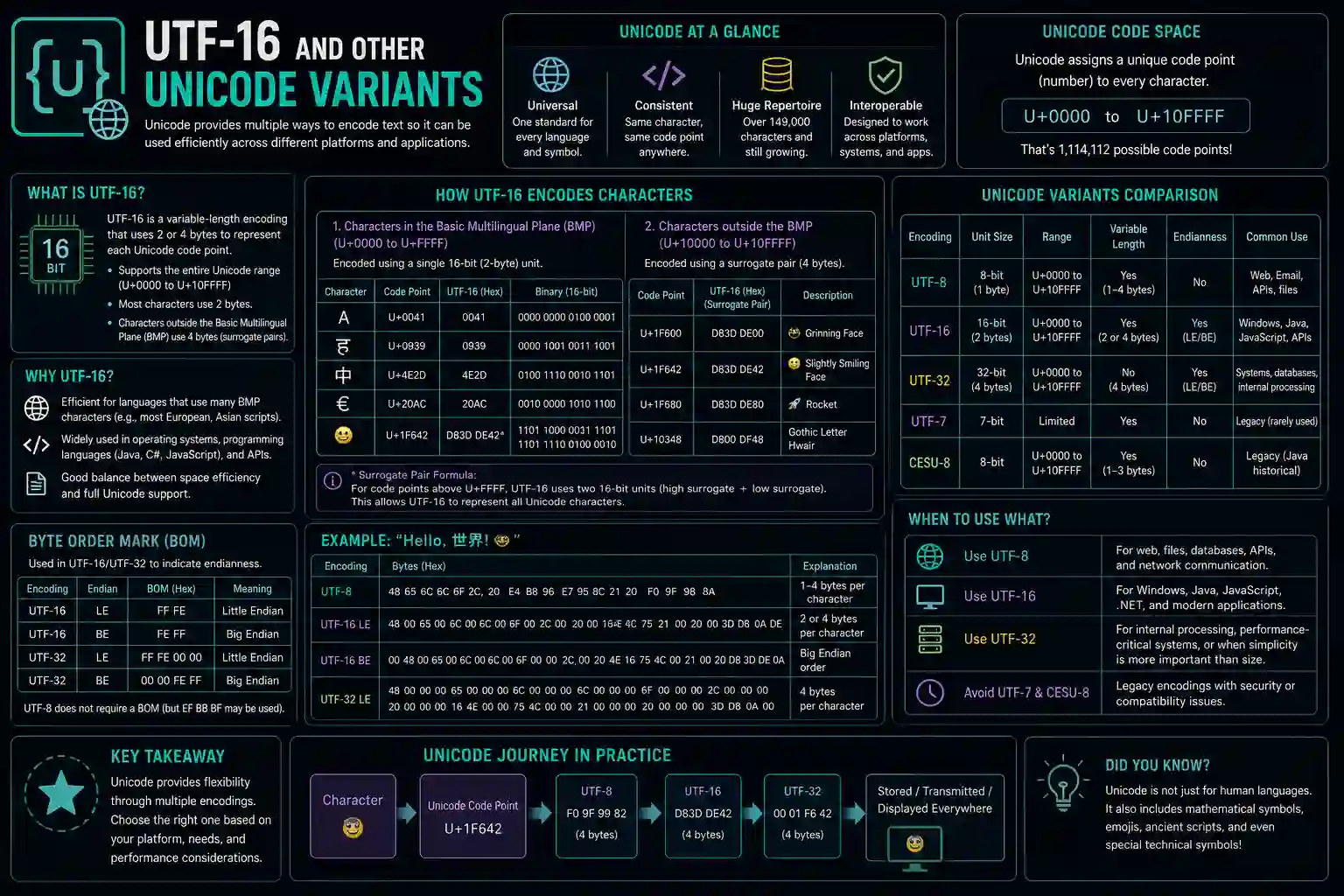
UTF-16 and Other Unicode Variants
UTF-16 uses 16 bits as its base unit, making it efficient for languages with large character sets like Chinese or Japanese. UTF-16 has two variants: little-endian and big-endian, which differ in how they order bytes within each character.
When Do You Need Binary to String Conversion?
Binary to string conversion serves specific practical purposes in development, data analysis, and digital forensics. Here are the situations where you’ll actually use this tool.
Network Packet Analysis
Network monitoring tools capture data packets in binary format. Converting these packets to strings reveals HTTP headers, request parameters, and transmitted messages. Security professionals use this technique to detect malicious traffic or debug API communication issues.
File Format Investigation
Binary files contain hidden metadata and header information stored as binary values. Converting portions of binary files to strings exposes file signatures, embedded comments, and format specifications. Developers use this when reverse-engineering file formats or recovering corrupted data.
Educational and Learning Contexts
Computer science students learn how computers represent text at the binary level. Converting between binary and strings demonstrates fundamental concepts like bit manipulation, character encoding, and data representation. It makes abstract concepts tangible.
Data Recovery and Forensics
Deleted files often leave binary traces on storage devices. Digital forensics experts convert these binary fragments to strings, searching for recoverable text like passwords, usernames, or document content.
How Do You Convert Binary to String Manually?
Manual conversion helps you understand the underlying process. While slower than automated tools, it builds your comprehension of how binary representation actually works.
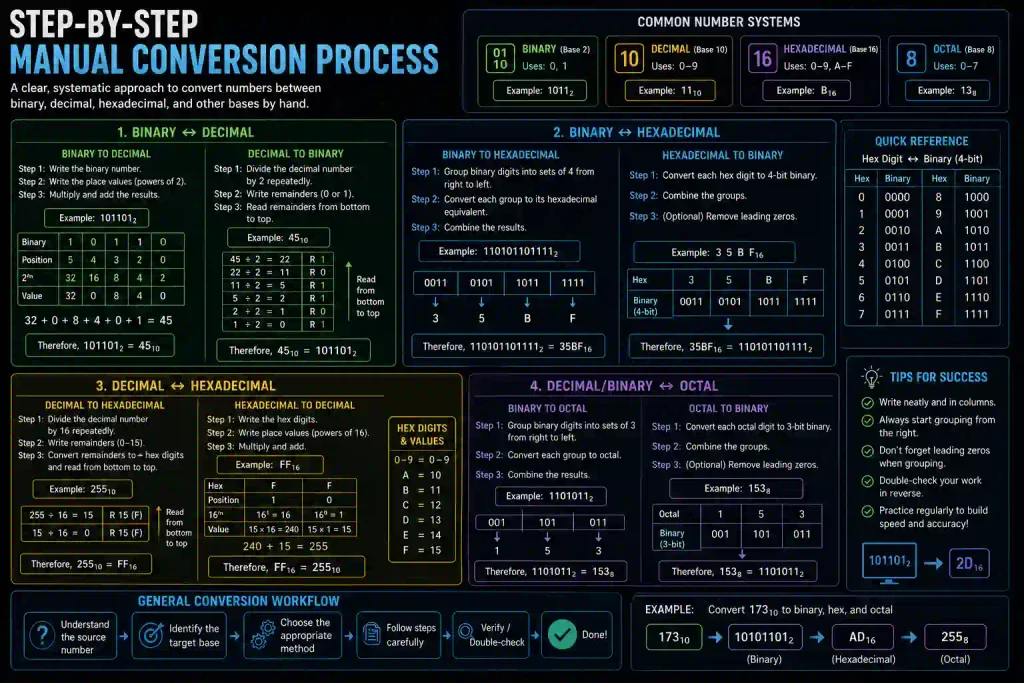
Step-by-Step Manual Conversion Process
Start with your binary string: 01010100 01100101 01111000 01110100
- Separate the binary into 8-bit groups (already done in this example)
- Convert each group to decimal using the positional method
- Look up each decimal value in an ASCII table
- Write down the corresponding character
- Combine all characters to form the final string
First group 01010100: (0×128) + (1×64) + (0×32) + (1×16) + (0×8) + (1×4) + (0×2) + (0×1) = 84 = “T”
Second group 01100101: (0×128) + (1×64) + (1×32) + (0×16) + (0×8) + (1×4) + (0×2) + (1×1) = 101 = “e”
Continue this process for remaining groups to get “Text”.
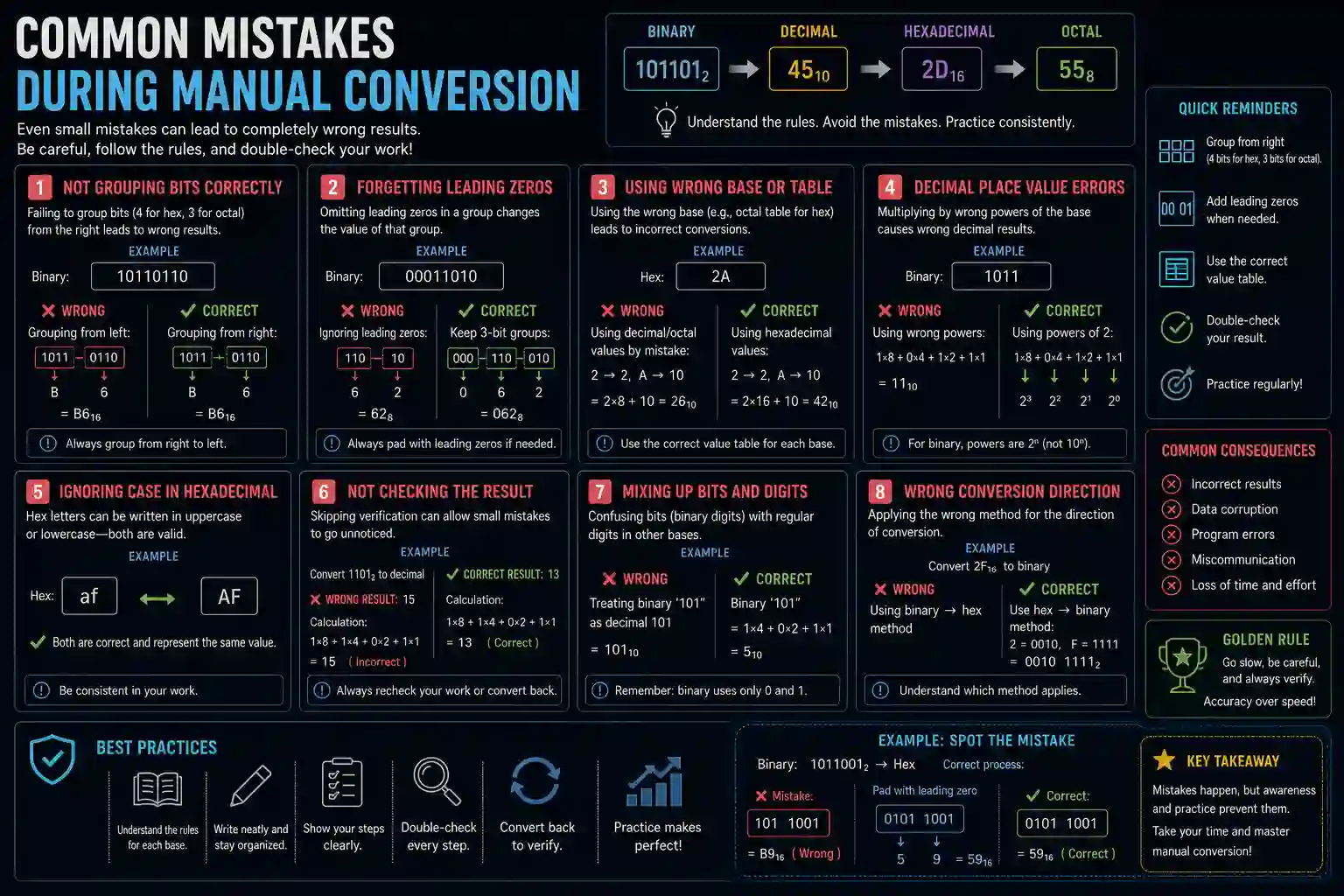
Common Mistakes During Manual Conversion
Mixing up bit positions causes incorrect decimal values. Always start from the rightmost bit as 2^0 and move left. Missing or extra bits throws off the entire conversion. Each group must contain exactly 8 bits for standard ASCII.
Confusing decimal 65 with character “A” instead of recognizing it represents uppercase requires an ASCII reference table nearby.
What Features Should a Good Binary Converter Have?
Not all binary to string converters offer the same functionality. The best tools include specific features that make conversion faster, more accurate, and more flexible.
Automatic Delimiter Detection
Quality converters automatically recognize spaces, commas, newlines, or no separators at all. You shouldn’t need to reformat your input just to make the tool work. Paste your binary data and let the converter figure out the structure.
Multiple Encoding Options
Support for ASCII, UTF-8, UTF-16, and other encodings matters. Different data sources use different standards. A converter that only handles ASCII limits your ability to work with international text or modern web content.
Bidirectional Conversion
The ability to convert both ways (binary to string and string to binary) saves time. You can verify your conversions by converting back and checking if you get the original input. This catches encoding errors immediately.
File Upload Capability
Typing or pasting large binary sequences gets tedious. File upload lets you convert entire binary files or logs without manual copying. Look for tools that handle both text files containing binary and actual binary files.
Error Handling and Validation
Good converters identify invalid binary input like groups with more or fewer than 8 bits, or characters other than 0 and 1. They highlight errors rather than producing garbage output.
| Feature | Why It Matters |
| Auto delimiter detection | Works with any binary format without preprocessing |
| Multiple encodings | Handles international characters and special symbols |
| Batch processing | Converts large datasets efficiently |
| Copy/download output | Simplifies workflow integration |
| Error messages | Identifies problems in input data |
How Is Binary to String Different from Other Conversions?
Binary data converts to several formats beyond strings. Each conversion type serves different purposes and follows different rules.
Binary to Decimal Conversion
Binary to decimal converts entire binary numbers to their base-10 equivalents without considering character encoding. The binary 10000000 becomes decimal 128, not a character. Use this for mathematical operations rather than text extraction.
Binary to Hexadecimal Conversion
Hexadecimal provides a shorter representation of binary data. Each hex digit represents 4 binary bits, making long binary strings more compact and readable. Developers often prefer binary to hexadecimal when viewing memory dumps or color codes.
Binary 11111111 becomes hex FF, which is more compact than writing all eight bits.
Binary to Integer vs Binary to String
Binary to integer treats the entire sequence as a single number. Binary to string processes the sequence in 8-bit chunks, with each chunk representing one character. The binary 01000001 01000010 becomes integer 16706 or string “AB” depending on which conversion you use.
What Are Common Problems When Converting Binary to String?
Several issues can produce incorrect or unreadable output. Recognizing these problems helps you troubleshoot failed conversions quickly.
Incorrect Bit Grouping
Binary data without delimiters might get grouped wrong. If your converter groups bits incorrectly (like 7-bit or 9-bit groups instead of 8), every character comes out wrong. Always verify your input has the correct structure.
Wrong Encoding Selection
Converting UTF-8 encoded binary using ASCII settings produces garbage characters. Special characters, accented letters, and non-Latin scripts require UTF-8 or UTF-16. When output looks scrambled, switch encoding standards.
Missing or Extra Bits
Incomplete bytes (fewer than 8 bits in the final group) cause errors. Some converters ignore the incomplete group, others pad it with zeros, and some throw errors. Check your source data has complete 8-bit sequences.
Non-Binary Characters in Input
Including characters other than 0 and 1 (like the letter O instead of zero) breaks conversion. Validators catch these mistakes, but simple converters might process them incorrectly or crash.
Frequently Asked Questions
Converting Binary to Readable Text Made Simple
Binary to string conversion bridges the gap between machine-readable code and human-readable text. Whether you’re debugging network packets, learning computer fundamentals, or investigating file formats, understanding this process gives you insight into how computers store and transmit information.
The conversion follows straightforward steps: group binary into 8-bit chunks, convert to decimal, map to characters using encoding standards, and assemble the final string. Online tools automate this process, but knowing the manual method helps you troubleshoot problems and understand what’s happening under the hood.
Choose converters that support multiple encodings, handle various delimiters, and provide clear error messages. Test with small samples before processing large datasets, and verify your encoding selection matches your source data.
Ready to convert your binary data? Try a reliable binary to string converter and see your 0s and 1s transform into meaningful text.