
Binary to Hexadecimal: The Complete Conversion Guide for 2025
Binary ⇄ Hexadecimal converter
Convert binary code to hexadecimal, or hex back to binary — instantly, in your browser.
Binary to hexadecimal conversion transforms base-2 numbers (using only 0s and 1s) into base-16 numbers (using 0-9 and A-F). This process condenses long binary strings into shorter, more readable hexadecimal values that programmers and computer scientists use daily.
According to Stack Overflow’s 2024 Developer Survey, over 67% of developers working in systems programming regularly convert between binary and hexadecimal when debugging memory addresses, analyzing network packets, or optimizing low-level code. The skill remains essential despite modern tools.
This guide breaks down everything you need to know about binary to hex conversion. You’ll learn the mathematical foundation, master manual conversion techniques, understand practical applications, and discover how to implement conversions in popular programming languages. Whether you’re debugging assembly code or interpreting color codes in web design, you’ll find actionable methods here.
What Is Binary and Hexadecimal?
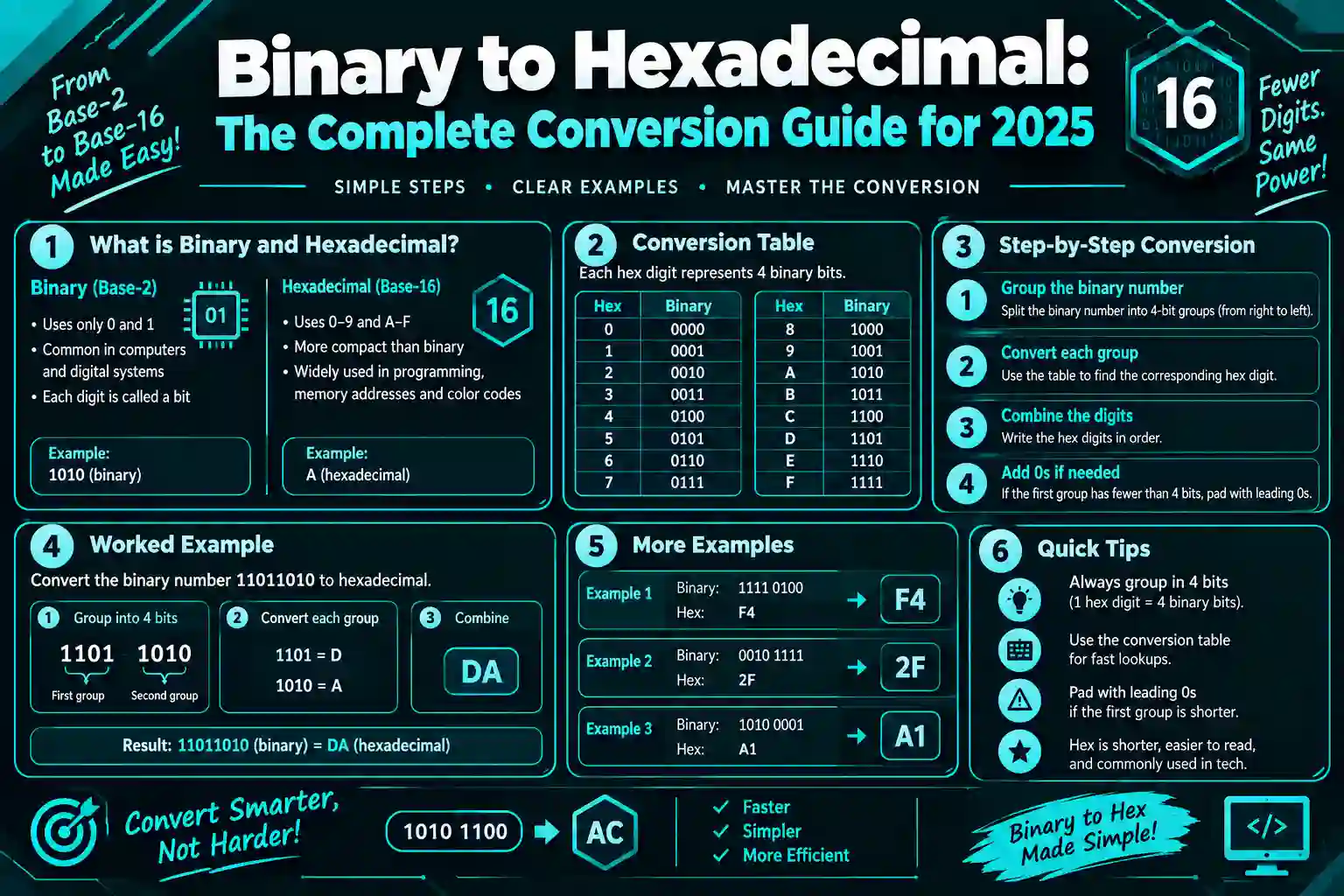
Binary is the base-2 number system using only digits 0 and 1, while hexadecimal is the base-16 system using digits 0-9 and letters A-F (representing 10-15). Both represent the same values computers process, but hexadecimal provides a more compact and human-readable format.
Computers operate entirely in binary. Every piece of data, from text files to video streams, exists as sequences of 0s and 1s inside your machine. But reading binary directly is tedious and error-prone for humans.
That’s where hexadecimal comes in. Each hexadecimal digit represents exactly four binary digits (called a nibble). This 4-to-1 relationship makes conversion straightforward and the resulting values far easier to parse at a glance.
Understanding Binary Numbers
Binary uses positional notation with powers of 2. The rightmost digit represents 2⁰ (which equals 1), the next represents 2¹ (which equals 2), then 2² (which equals 4), and so on.
Take the binary number 1011. Reading right to left: (1×1) + (1×2) + (0×4) + (1×8) = 11 in decimal. Each position doubles in value as you move left.
Understanding Hexadecimal Numbers
Hexadecimal uses positional notation with powers of 16. It needs 16 distinct symbols, so it uses 0-9 for values zero through nine, then A-F for values ten through fifteen.
The hex number 2F breaks down as: (F×1) + (2×16). Since F equals 15, that’s 15 + 32 = 47 in decimal. The letter symbols feel strange at first but become second nature with practice.
The Relationship Between Binary and Hex
Here’s the key insight: 2⁴ equals 16. That means four binary digits create exactly 16 possible combinations (from 0000 to 1111), which map perfectly to the 16 hexadecimal digits (from 0 to F)
| Binary | Hexadecimal | Decimal |
|---|---|---|
| 0000 | 0 | 0 |
| 0001 | 1 | 1 |
| 0010 | 2 | 2 |
| 0011 | 3 | 3 |
| 0100 | 4 | 4 |
| 0101 | 5 | 5 |
| 0110 | 6 | 6 |
| 0111 | 7 | 7 |
| 1000 | 8 | 8 |
| 1001 | 9 | 9 |
| 1010 | A | 10 |
| 1011 | B | 11 |
| 1100 | C | 12 |
| 1101 | D | 13 |
| 1110 | E | 14 |
| 1111 | F | 15 |
This table is your reference chart. Memorize it and conversions become almost automatic. You’ll recognize patterns quickly once you’ve converted a few dozen numbers.
How Do You Convert Binary to Hexadecimal?
To convert binary to hexadecimal, group the binary digits into sets of four starting from the right, then replace each group with its corresponding hexadecimal digit. If the leftmost group has fewer than four digits, add leading zeros to complete it.
The process relies on that 4-to-1 mapping between binary nibbles and hex digits. Since four binary digits always map to exactly one hex digit, you never need complex calculations or intermediate steps.
Step-by-Step Conversion Method
Let’s convert the binary number 110110111011 to hexadecimal.
Step 1: Start from the rightmost digit. Group the binary number into sets of four digits. For 110110111011, you get: 1101 1011 1011.
Step 2: If the leftmost group has fewer than four digits, pad it with zeros. Our example has three digits in the leftmost group (110), so add one zero: 0110 1011 1011.
Step 3: Look up each four-digit group in the conversion table. Reading left to right: 0110 = 6, 1011 = B, 1011 = B.
Step 4: Write the hexadecimal digits in the same order. The result is 6BB.
That’s it. The binary number 110110111011 equals the hexadecimal number 6BB. Once you know the table, the entire process takes seconds.
Converting Binary Decimals to Hexadecimal
Binary numbers can have fractional parts after a decimal point. The same grouping method works, but you group in both directions from the decimal point.
Take the binary number 1010.1101. Split at the decimal: 1010 and 1101. Convert each group: 1010 = A, 1101 = D. The hexadecimal result is A.D.
For the fractional part, if you don’t have four digits, pad with zeros on the right instead of the left. The binary 101.11 becomes 0101.1100 after padding, which converts to 5.C in hexadecimal.
Quick Conversion Examples
Here are five quick examples to build your intuition:
- Binary 1111: One group of 1111 = F
- Binary 10000000: Groups 1000 0000 = 80
- Binary 11111111: Groups 1111 1111 = FF
- Binary 1010101010: Groups 10 1010 1010, pad to 0010 1010 1010 = 2AA
- Binary 101.101: Groups 0101.1010 = 5.A
Notice that FF is the largest two-digit hex number, which represents 255 in decimal and 11111111 in binary. These round numbers appear constantly in computing (like RGB color values or byte ranges).
Why Convert Binary to Hexadecimal?
Converting binary to hexadecimal makes data more readable while preserving exact binary values. Hex reduces visual clutter, minimizes transcription errors, and speeds up pattern recognition in memory addresses, machine code, network protocols, and color encoding.
Nobody wants to read a 32-bit memory address in binary. The address 11010111101011001010000011110101 is unmanageable. In hexadecimal, it becomes D7AC283D, which is far easier to remember, communicate, and compare.
Memory Addresses and Debugging
Memory addresses in most systems are displayed in hexadecimal. When your debugger shows 0x7FFF5C4A, you’re looking at a hex representation of a binary address. Programmers use hex addresses to track variable locations, identify memory leaks, and analyze crash dumps.
Imagine debugging a pointer error with binary addresses. You’d lose your mind. Hex keeps the exact precision of binary while staying human-readable.
Color Codes in Web Design
Web colors use hexadecimal RGB values. The color #FF5733 breaks down as FF (red), 57 (green), and 33 (blue). Each pair is a hex number from 00 to FF representing that color channel’s intensity.
Under the hood, each hex digit pair represents eight binary bits. FF is 11111111 (maximum intensity), while 00 is 00000000 (no intensity). Designers rarely think about the binary, but the hex-to-binary relationship makes the system work.
Machine Code and Assembly Language
Assembly language instructions and machine code opcodes appear in hexadecimal. When you examine compiled code in a hex editor, you see the actual bytes the CPU executes.
An instruction might look like B8 05 00 00 00 in hex. Each byte (like B8) represents eight bits of binary data (10111000), but reading it in hex is vastly more practical.
Network Protocols and Packet Analysis
Network packets display in hex dumps. Tools like Wireshark show packet contents in hexadecimal because it compresses binary data without losing precision.
A TCP packet header might show values like 0x0050 for the port number. That’s hexadecimal 50, which equals decimal 80 (the HTTP port). Binary would be 0000000001010000, which nobody wants to parse manually.
What Are Common Binary to Hex Conversion Tools?
Binary to hexadecimal converters exist as online calculators, programming language functions, command-line tools, and calculator apps. Most modern programming languages include built-in functions for instant conversion without manual calculation.
You don’t always need to convert by hand. Tools exist for speed and accuracy, especially when dealing with long binary strings or batch conversions.
Online Binary to Hex Converters
Web-based converters let you paste binary numbers and instantly get hexadecimal results. These tools handle arbitrary-length inputs and often show the conversion steps.
Most online converters also work in reverse, converting hex to binary. Some show intermediate decimal values or break down the conversion process for learning purposes.
Programming Language Functions
Every major programming language provides built-in conversion functions. These run faster than manual conversion and handle edge cases automatically.
In Python, you convert binary to hex like this:
binary_string = “110110111011”
decimal_value = int(binary_string, 2)
hex_value = hex(decimal_value)
print(hex_value) # Output: 0x6bb
The int() function with base 2 converts binary to decimal, then hex() converts decimal to hexadecimal. Python adds the 0x prefix automatically.
In JavaScript, the process looks similar:
let binaryString = “110110111011”;
let decimalValue = parseInt(binaryString, 2);
let hexValue = decimalValue.toString(16);
console.log(hexValue); // Output: 6bb
The parseInt() function handles the binary-to-decimal step, and toString(16) converts to base-16 (hexadecimal).
Command-Line Tools
Unix-based systems include command-line utilities for base conversion. The printf command handles binary to hex conversion directly:
printf ‘%x\n’ “$((2#110110111011))”
This outputs 6bb. The 2# prefix tells the shell to interpret the number as base-2 (binary), and %x formats the output as hexadecimal.
Calculator Applications
Scientific calculators and programmer calculators built into operating systems support base conversion. Windows Calculator in Programmer mode, macOS Calculator in Programmer view, and Linux calculators like KCalc all convert between binary, decimal, and hexadecimal.
These visual tools help when learning because you can see multiple representations simultaneously. You input a value in one base and instantly view it in all others.
How Does Binary to Octal Conversion Compare?
Binary to octal conversion groups binary digits into threes instead of fours, since 2³ equals 8 (the octal base). While similar in concept, octal is less common in modern computing than hexadecimal because hex aligns better with byte boundaries.
Octal uses digits 0-7 and was popular in early computing systems. The conversion method mirrors hex conversion but with different groupings.
For the binary number 110110111, group into threes from the right: 110 110 111. Convert each group: 110 = 6, 110 = 6, 111 = 7. The octal result is 667.
Modern systems favor hexadecimal because bytes contain eight bits, which divides evenly into two four-bit nibbles. Octal’s three-bit groupings don’t align with byte boundaries, making hex more practical for most applications.
For more details on octal conversion, see our guide on binary to octal conversion methods.
What Tools Help With Text and Binary Conversion?
Text to binary converters transform readable characters into their binary representations using character encoding standards like ASCII or UTF-8. These tools are essential when analyzing how text data is stored at the bit level.
Every text character has a numeric code. The letter A is 65 in ASCII, which is 01000001 in binary and 41 in hexadecimal. When you type text, your computer stores these binary patterns.
A binary to string converter does the reverse operation, taking binary data and displaying the corresponding text characters. This helps when examining file formats, network data, or debugging text encoding issues.
For example, the binary sequence 01001000 01101001 converts to the text “Hi” because 01001000 is the letter H and 01101001 is the letter i in ASCII.
If you need to convert binary directly to readable text, a binary converter to text online tool handles the character mapping automatically. These tools support various encodings beyond ASCII, including Unicode for international characters.
How Do You Handle Large Binary Numbers?
For large binary numbers, divide the conversion into manageable chunks by grouping into fours, converting each group independently, then combining the results. This segmented approach prevents errors and works for any binary length.
A 64-bit binary number might look overwhelming at first. But it’s just sixteen groups of four bits, which means sixteen hex digits. The strategy stays the same regardless of size.
Take the 32-bit binary number 11010111101011001010000011110101. Group it: 1101 0111 1010 1100 1010 0000 1111 0101. Convert each nibble: D 7 A C A 0 F 5. The hex result is D7ACA0F5.
Work systematically from right to left. Mark every fourth digit with a space or vertical line to keep groupings clear. Check each group twice before moving to the next.
What Are Common Mistakes in Binary to Hex Conversion?
Common conversion errors include incorrect grouping direction, forgetting leading zeros on the leftmost group, misreading the reference table, and mixing up binary digit positions. Double-checking your groupings prevents most mistakes.
Rushing through conversions introduces errors. Each nibble must contain exactly four digits, and you must start grouping from the right side of the number, not the left.
Grouping From the Wrong Direction
Always group from right to left. If you group from left to right, your alignment shifts and every hex digit comes out wrong.
For binary 1110101, incorrect left-to-right grouping gives 111 0101, which doesn’t align properly. Correct right-to-left grouping gives 0111 0101, converting to 75 in hex.
Missing Leading Zeros
The leftmost group needs padding if it has fewer than four digits. Without those zeros, you’ll convert the wrong value.
Binary 11011 should become 0001 1011 (which is 1B in hex), not just 11011 treated as a single group (which would be meaningless).
Reference Table Errors
Misreading the table is easy when you’re tired. The values 1101 (D) and 1011 (B) look similar but represent different numbers. Slow down and point to each entry as you look it up.
Decimal Point Placement
When converting binary decimals, keep the decimal point in the same position. If the binary is 1010.11, the hex result must be A.C with the decimal point between the same digit boundaries.
How Is Hexadecimal Used in Programming?
Programmers use hexadecimal to represent memory addresses, define color values, encode binary data in readable formats, specify bit masks, and examine raw file contents. Hex appears throughout low-level and systems programming.
High-level languages shield you from hex most of the time. But once you work with memory, hardware interfaces, or data serialization, hex becomes unavoidable.
Bit Masks and Bitwise Operations
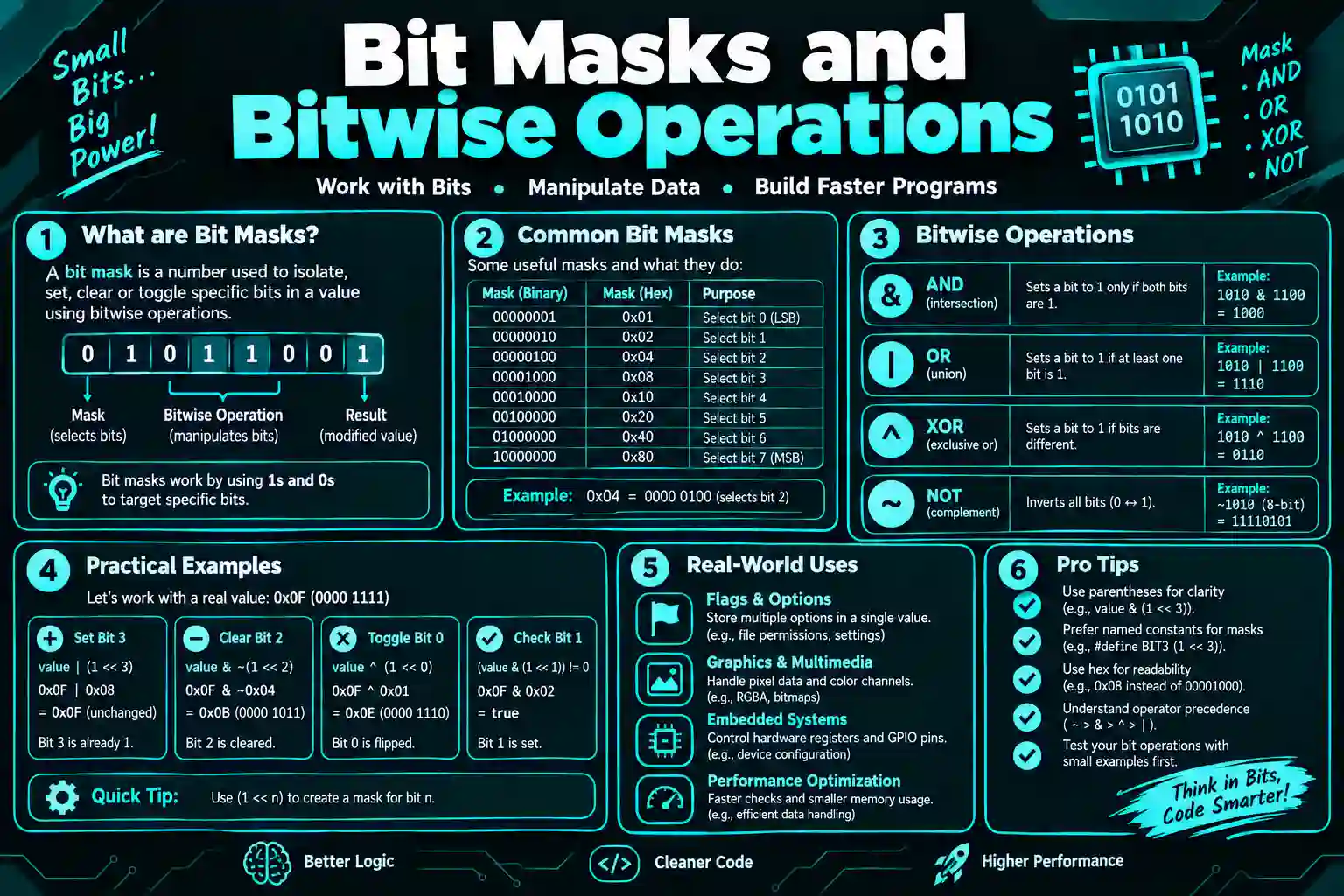
Bit masks control individual bits using bitwise AND, OR, and XOR operations. Programmers write masks in hex because it’s clearer than binary.
The mask 0xFF sets the lowest eight bits to 1. In binary, that’s 11111111, but writing 0xFF is shorter and easier to recognize. You can combine masks like 0xFF00 to target specific byte positions.
File Formats and Magic Numbers
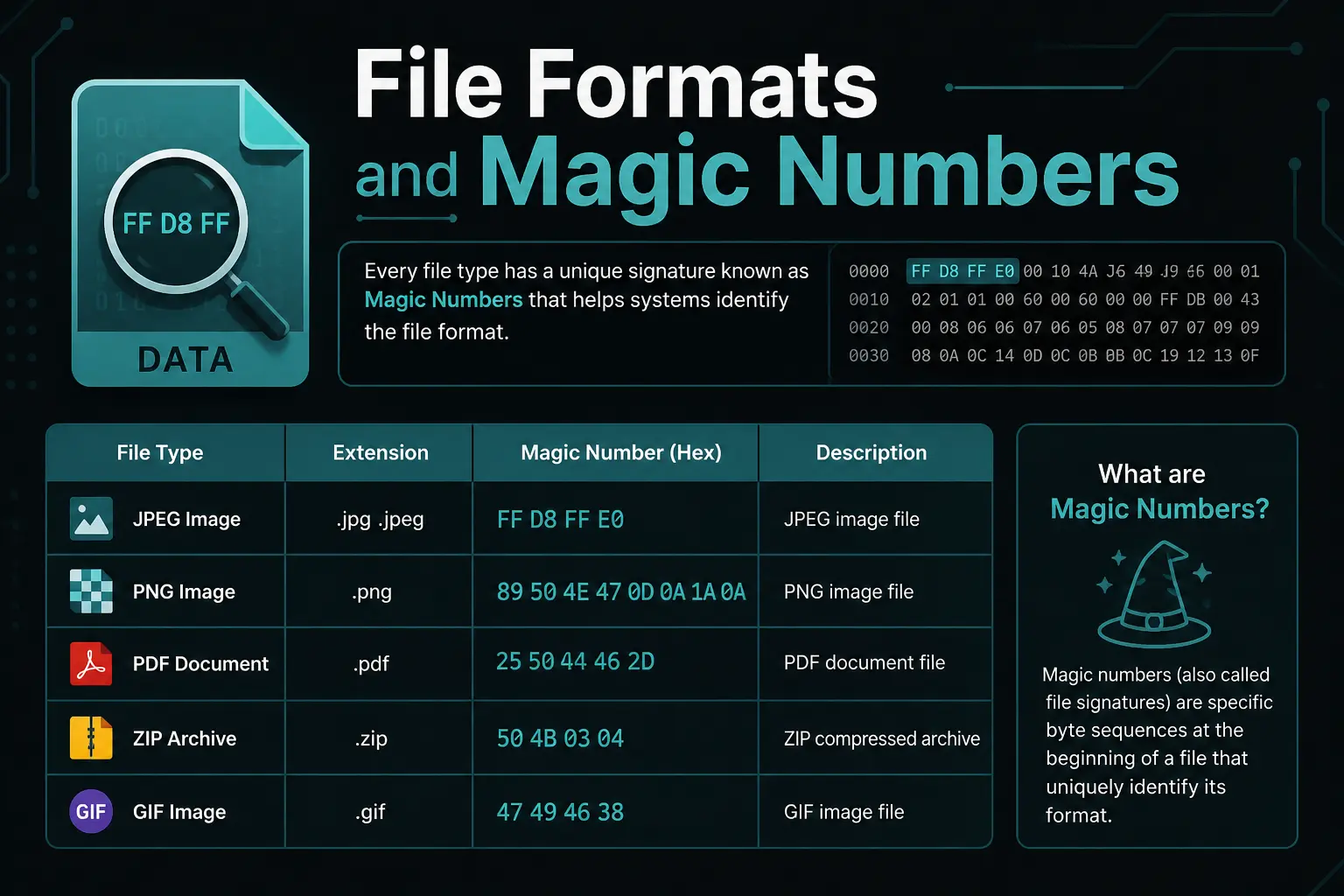
File formats often start with “magic numbers” that identify the file type. A PNG file begins with the bytes 89 50 4E 47, written in hex. Examining these bytes in a hex editor confirms file types.
JPEG files start with FF D8 FF. PDF files start with 25 50 44 46 (which spells “%PDF” in ASCII). These hex signatures help programs recognize file formats even when extensions are wrong or missing.
Character Encoding and Escape Sequences
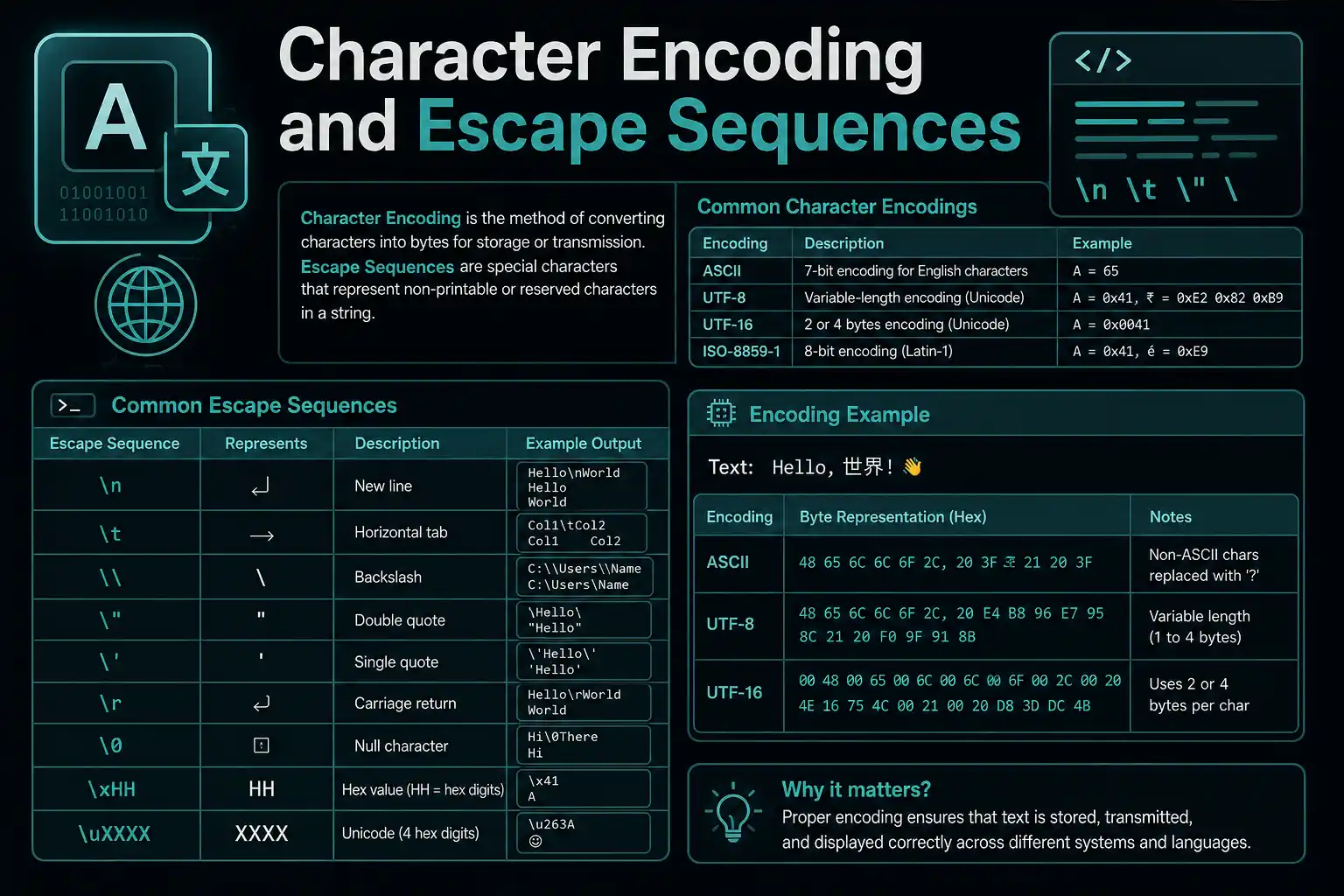
String literals in many languages support hex escape sequences. The sequence \x41 represents the letter A (hex 41 is decimal 65, the ASCII code for A).
In C, you might write: char letter = ‘\x41’; This sets the variable to the character with hex value 41. Python, Java, and other languages support similar syntax.
What Is the Hexadecimal Representation of Common Binary Patterns?
Common binary patterns like all zeros (0000 = 0), all ones (1111 = F), alternating bits (1010 = A), and byte boundaries (11111111 = FF) appear frequently in computing and have recognizable hexadecimal equivalents worth memorizing.
Certain patterns show up repeatedly. Recognizing them speeds up conversion and helps you spot errors.
| Binary | Hexadecimal | Decimal |
|---|---|---|
| 0000 | 0 | 0 |
| 0001 | 1 | 1 |
| 0010 | 2 | 2 |
| 0011 | 3 | 3 |
| 0100 | 4 | 4 |
| 0101 | 5 | 5 |
| 0110 | 6 | 6 |
| 0111 | 7 | 7 |
| 1000 | 8 | 8 |
| 1001 | 9 | 9 |
| 1010 | A | 10 |
| 1011 | B | 11 |
| 1100 | C | 12 |
| 1101 | D | 13 |
| 1110 | E | 14 |
| 1111 | F | 15 |
Once you recognize these patterns, you’ll convert faster and catch errors immediately. If you’re expecting a bit mask and get 0G, you know something went wrong (G isn’t a valid hex digit).
How Do Signed Numbers Work in Hexadecimal?
Signed binary numbers use two’s complement representation, where the leftmost bit indicates sign (0 for positive, 1 for negative). When converted to hexadecimal, negative numbers start with hex digits 8-F in the most significant position for fixed-width representations.
Signed integers complicate conversion slightly because the same bit pattern means different things depending on whether you interpret it as signed or unsigned.
The 8-bit binary 11111111 equals FF in hex. As an unsigned value, that’s 255 in decimal. As a signed two’s complement value, it’s -1 in decimal. The hex representation stays the same, but the interpretation changes.
For 8-bit signed integers, hex values 00-7F represent positive numbers (0 to 127), while 80-FF represent negative numbers (-128 to -1). The boundary is at 80, which is 10000000 in binary (the sign bit is set).
Converting Negative Binary Numbers
Convert negative binary numbers to hex the same way as positive numbers. The sign information exists in the bit pattern itself.
Take the 8-bit two’s complement binary 10110100. Group it: 1011 0100. Convert: B 4. The hex is B4, which represents -76 in signed interpretation or 180 in unsigned interpretation.
Context determines how you interpret the hex value. Always know whether you’re working with signed or unsigned data before converting.
What Are Practical Exercises for Learning Binary to Hex Conversion?
Practice converting random binary numbers to hex, verify results with online calculators, convert hex color codes to binary, examine memory dumps, and solve programming challenges that require base conversion. Repetition builds fluency faster than theory alone.
Reading about conversion helps. But actual practice cements the skill. Aim to convert 10-20 numbers daily for a week.
Daily Conversion Drills
Generate random binary numbers and convert them to hex by hand. Then check your answers with a calculator or online tool. Start with 8-bit numbers, then move to 16-bit and 32-bit.
Track your speed and accuracy. You should be able to convert an 8-bit binary number to hex in under 20 seconds once you’ve practiced for a few days.
Hex Color Code Exercises
Take any web color code like #3A7BD5 and convert each hex digit pair to binary. 3A becomes 00111010, 7B becomes 01111011, D5 becomes 11010101. This gives you the full 24-bit RGB binary representation.
Then reverse the process: take the binary and convert back to hex. If you get the original color code, you did it correctly.
Memory Dump Analysis
Examine memory dumps or hex editor output from real programs. Find patterns, identify ASCII text (readable characters appear as 40-7E in hex), and convert interesting values to binary to see the bit patterns.
This real-world exposure shows why hex matters beyond academic exercises. You’ll start recognizing common values like 0x00 (null), 0xFF (max byte), and 0x20 (space character).
Programming Challenges
Solve coding problems that require base conversion. Platforms like LeetCode, HackerRank, and Project Euler include challenges involving binary and hexadecimal manipulation.
Write functions that convert binary to hex without using built-in conversion methods. This forces you to understand the underlying logic rather than just calling library functions.
How Do You Verify Binary to Hex Conversion Results?
Verify conversions by converting the hex result back to binary and comparing it with the original, using multiple online calculators to confirm results, or checking with programming language functions that handle conversion automatically.
Mistakes happen, especially when learning. Always double-check important conversions before using them in code or documentation.
Reverse Conversion Method
After converting binary to hex, immediately convert that hex back to binary. If you get your original binary number, the conversion was correct.
You converted 11010111 to D7. Now convert D7 back: D is 1101, 7 is 0111, giving you 11010111. Perfect match means you did it right.
Multiple Tool Verification
Use two or three different online calculators or tools. If they all give the same result, you can trust it. If one disagrees, investigate which is correct.
Programming language outputs are generally reliable. If Python’s hex() function gives you a different answer than your manual conversion, your manual work probably has an error.
Decimal Intermediate Check
Convert the binary to decimal, then convert that decimal to hex. Then convert the hex to decimal and verify it matches your first decimal result.
Binary 1101 → Decimal 13 → Hex D. Then Hex D → Decimal 13. Both decimals match, so 1101 = D is correct.